
Resources for Mahomet Seymour CUSD #3
“Getting Started with Your Bee-Bots”
This information was presented for the Mahomet Seymour CUSD #3 in March 2026.
Below are links to web pages and files discussed or mentioned during the training.
Meet Bee-Bot

Bee-Bot needs to be charged before its first use. Details below.
On top of Bee-Bot are these buttons you can press to control it.
Note that the left and right buttons turn it, but do not move it.
Some younger students may be confused by this at first.

Bee-Bot has three switches underneath, for power, sound, and sensor.
Turn them all on, unless you want them to be silent. The sensor switch is discussed below.
)
Bee-Bot moves forward and back, one step at a time.
One step is equal to 6 inches, 15 centimeters, or 1 length of Bee-Bot.
Bee-Bots can store up to 200 commands.
Charging Information
All switches need to be set to OFF in order for Bee-Bot to charge.
- Flashing Red – Low battery: needs charging
- Solid Red – Charging
- Solid Green – Fully charged
It may take up to 2 hours to fully charge Bee-Bot if the battery has been fully discharged.
Once fully charged, Bee-Bot will have about 6 hours of normal usage, and about 1.5 hours of continuous use.
Read more information about Bee-Bots here.
Caring For Your Bee-Bots
Important information to get the most out of your Bee-Bots and extend their battery life:
- Charge the Bee-Bots before their first use.
- Do not charge Bee-Bots longer than overnight.
- Make sure the hives are unplugged before vacations.
- Charge the Bee-Bots every month or two even when they are just being stored.
For more information about batteries and other FAQs, visit this page.
Introducing Students to Bee-Bot
Choose the method that works best for your situation. Here are two examples:
- Have children discover what the buttons do on their own in a small group.
- Demonstrate how to use Bee-Bot.
Here’s a fun story about how students “discovered” Bee-Bot.
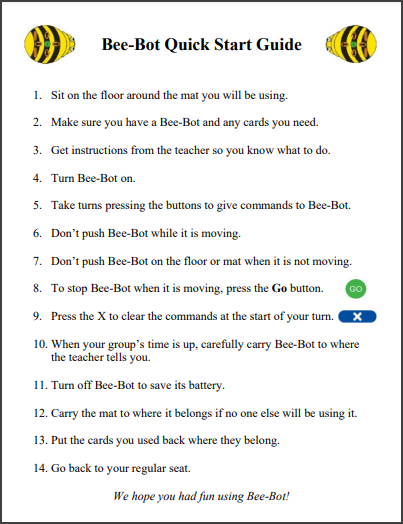
Bee-Bot Quick Start Guide
This Quick Start Guide can serve as a guide to using Bee-Bots in the classroom.
Create your own version that works best for your situation.
Beginning Bee-Bot Activities

-
Have students discover what Bee-Bot’s buttons do. Make sure they understand that they need to press
Clearbetween turns to erase all the commands. -
Have students sit in a big circle. Have one student point Bee-Bot at another student across the circle and estimate how many times to press the forward arrow button. Remind students not to push Bee-Bot to move it. They should pick it up and move it to where they want it.
-
Have students pick a spot in the room to send Bee-Bot to. Getting there may require turns. How many tries does it take to get it there?
-
Have students think up a simple pattern that they can repeat, like the staircase above.
-
Create a maze for Bee-Bot to go through. The walls of the maze could be small boxes, blocks, rulers, or pencils.
-
Create cards with numbers or letters. Have students arrange them on the floor. Ask the students to go to a particular number or letter. Can they go to all the numbers in order? Be sure to space the cards apart from each other. The students or teacher can adjust the placement of the cards as the activity progresses. There are number and letter card images in Bee-Bot Lessons that you can print.
-
Use number cards to practice addition. Use letter cards to spell sight words.
-
Write words that make a sentence on cards. Spread out the cards and see if Bee-Bot can move from card to card to make the sentence. This video shows an example.
-
Turn on the sensor and record a message to be spoken when one Bee-Bot gets near another. Details below.
-
Have students create a dance with several Bee-Bots. They can plan the dance using Command Cards. Does the dance need some music? Check out this Bee-Bot Dance!
-
Create a Bee-Bot parade! Decorate balloons, tie them to Bee-Bot and have them follow each other. Check out this Bee-Bot Parade!
Bee-Bot Job Cards
Engage all students by giving each one a job to perform as they play together with their Bee-Bots.
From San Francisco Unified School District’s Kindergarten to 2nd Grade Computer Science Curriculum:

Bee-Bots Can Talk! How to Customize Their Sounds
You can record a sound when a command button is pressed. Here’s how:
- Press and hold a button for 2 seconds and wait for a beep.
- Record your message. A double beep ends the recording.
To erase all sounds, press and hold the Clear button for 2 seconds until you hear a double beep.
Students may accidentally hold down a button and create a recording they didn’t intend to.
Bee-Bots can sense each other when they get within 10 inches.
You will hear a pre-recorded sound, but you can also record your own sound. Here’s how:
- Turn on the Sensor switch underneath the Bee-Bot.
- Hold down the
Gobutton for 2 seconds and wait for a beep. - Record your message. A double beep ends the recording.
For more information, please refer to this article.
Online Bee-Bot Emulator

Curriculum Materials for Classroom and Online
Main Curriculum Page: Lessons, online activities, and teaching materials for Bee-Bot and Blue-Bot
| Bee-Bot Lessons | Table of Contents | Get a 30-day free trial. You have already licensed this curriculum. |
| Problem-Solving with Bees and Blues | Table of Contents | Get a 30-day free trial. |
| Exploring Math with Blue-Bot | Table of Contents | Get a 30-day free trial. |
Most activities in Exploring Math with Blue-Bot also work with Bee-Bot.
A tour of Bee-Bot Lessons.
Accessories and Lesson Ideas for Bee-Bot Mats
Lesson Ideas for Learning Mats

Images from the 3D Community Construction Kit were shown in use with the Card Mat.
Teacher-Created Mats (Online)
Online mats created by teachers to share with other educators.
You can request that we post a mat you design. Read more.
Coding Journeys (Online)
Coding Journeys expose students to different robots and help you see which ones are best for them.
Monthly Calendar Mats (Online)
Use the Calendar Emulator Mats to reinforce your students’ calendar skills.
Customer Stories (Online)
Customer Stories show how other teachers and researchers are using Bee-Bots.
Click the word Bee-Bot in the word cloud at the top to see the Bee-Bot stories.
Articles for Educators
These articles offer teaching tips, ideas, and strategies for using Bee-Bots with students.
Connect With Us
Newsletters

Bee-Bot Buzz: Sign up for free bimonthly emails with articles, teaching tips, and more

Bee-Bot Insider: Sign up for free occasional emails with news, bonus online mats, special offers
Social Media
Facebook: BeeBot.us
Instagram: terrapin.tools.for.thinking
YouTube: Terrapin’s YouTube Channel
Have more questions? Send an email to the presenter.
(c) 2026 Terrapin