|
Logo Blocks is our new coding experience for all ages.
And, it's free!
For those of you who are familiar with block coding and want to jump right in, go straight to Logo Blocks!
When your Bee-Bot and Blue-Bot users are ready for a block programming environment, we make it easy to get going with the Quick Start Guide.
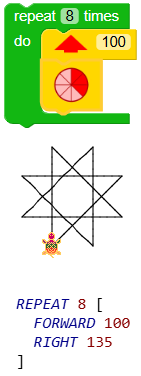
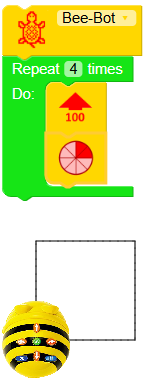
Logo Blocks uses the Logo programming language, designed at MIT specifically for children. Logo's iconic turtle draws on the screen, following directions you give it. You can even set its shape to look like Bee-Bot!
Logo Blocks requires minimal typing. Just drag blocks together to move and turn the turtle. Your code is translated into Logo commands on the fly for students to see. All code can be saved for future use.
Three modes, each with its own tutorial and set of activities, offer fun challenges for all learners.
-
Beginning mode ~ move and turn the turtle any amount and create loops using REPEAT
-
Intermediate mode ~ use more graphics commands, multiple turtles, If/Then conditionals; write procedures
-
Advanced mode ~ handle keyboard and mouse events, user input, variables, and recursion
Read about Logo Blocks, tutorials, and activities.
Try Logo Blocks now! Click the Help tab to get started.
Logo Blocks runs in a browser and is best suited to a desktop, laptop, or Chromebook.
We want to feature your students' masterpieces in the Logo Blocks Gallery. Use this form and choose `I would like to share my Logo or Logo Blocks program.`
Whether your students are drawing shapes or creating games and simulations, Logo Blocks offers endless opportunities!
|