
Everything Pro-Bot
Pro-Bot Robots, Accessories & Learning Resources
Ready to do more with Pro-Bot? Explore classroom sets, drawing and activity accessories, charging and storage options, lessons, online activities, and other resources to help you get the most from Pro-Bot.
Bring Pro-Bot to More Students
Pro-Bot Six Pack
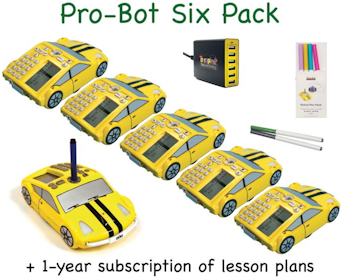 The Pro-Bot Six Pack includes everything you need to get started with multiple Pro-Bots in your classroom.
It contains:
- 6 Pro-Bots
- 1 Robot Pen Pack
- 1 Six-Bot USB Charger
- One year of Pro-Bot Lessons
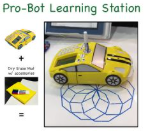 Pro-Bot Learning Station
The Pro-Bot Learning Station is perfect for an activity center in your classroom. It includes:
With multiple Pro-Bot Learning Stations, teams of students can work on their projects at the same time.
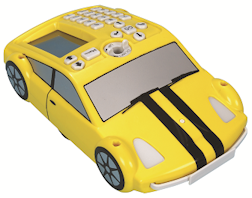 Pro-Bot Robot
Pro-Bot is a sophisticated robot cleverly disguised as a race car, offering students an enticing, engaging, and hands-on experience with coding and robotic controls.
Pro-Bot commands are entered via a set of arrow and number keys mounted on the back. No other device is needed!
Insert a pen and Pro-Bot draws as it moves - a great motivator for learning about math operations and geometry.
Pro-Bot Accessories
Draw & Create
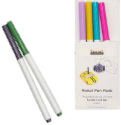 Robot Pen Pack
The Robot Pen Pack contains a set of 6 brightly colored felt tip pens that fit snugly into Pro-Bot’s pen mechanism. These long-lasting, non-toxic, washable pens work on newsprint, poster board, paper rolls, and other common drawing surfaces. Colors may vary from pack to pack, but each pack contains all different colors.
Dry Erase Mat (with accessories)
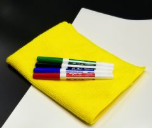 The Dry Erase Mat offers a generous drawing surface that is smooth, easy to write on, and erases cleanly. When not in use the Dry Erase mat rolls up to be stored in its own portable tube. Use it over and over! It includes:
- 1 white dry erase surface (36 x 48 inches)
- 4 multi-color dry erase markers, perfectly sized to fit Pro-Bot’s pen holder
- 1 machine-washable cleaning cloth
 Dry Erase Accessory Set
The Dry Erase Accessory Set contains a cleaning cloth and four dry erase markers that fit snugly into the Pro-Bot pen mechanism. Use this by itself or as a replacement part for the Dry Erase Mat kit.
Explore & Challenge
 Route Mat
The Route Mat features a variety of roads for Pro-Bot to navigate. Using the colorful, criss-crossing paths, students can select a route and program Pro-Bot to follow it. The mat accommodates shapes like squares, rectangles, circles, and triangles, as well as custom paths designed by students. This layout provides consistent challenges, encouraging students to develop their programming and problem-solving skills as they guide Pro-Bot through each navigation task.
Robot Sports Camera
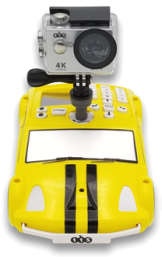 The Robot Sports Camera includes:
- Robot Camera Mount
- Waterproof housing
- Splash proof, wireless remote control
- Rechargeable battery
- USB charging cable
- Lens cleaning cloth
- A wide selection of straps, tethers, and mounts to attach Robot Camera to nearly anything!
NOTE: Micro SD card, required for use, is not included.
Read tips on how to use the Robot Sports Camera.
 Guard Mats (clear)
The Guard Mats provide a clear surface on which Pro-Bot can roam and draw. Two sizes are available: Small (36” by 36”) and Large (36” by 60”). Wash them easily with cleaner and paper towel. Use the Guard Mats as a protective surface under paper when drawing with Pro-Bot on carpet. When placed over other materials, Guard Mats allow Pro-Bot to navigate and draw over posters, maps, or other images without marking or harming them.
Store & Charge
 Hive Case
The Hive Case keeps your Pro-Bots neatly organized and protected. It accommodates a Pro-Bot Six Pack and accessories in one convenient location. It provides a perfect way to store and transport your Pro-Bots.
Six-Bot USB Charger
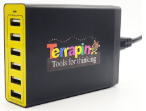 The Six-Bot USB Charger allows you to charge up to 6 Pro-Bots or other USB devices at the same time using a single electrical outlet. Each of the six USB ports adapts to optimal charging for the device connected, at up to 2.4A for the fastest charge, and a built-in circuit breaker prevents damage.
 USB Charging Cable for Pro-Bot
The Pro-Bot Charging Cable is useful if you ever misplace the cable that came with Pro-Bot or want to have an additional one in a separate location.
Lessons and Online Activities
Pro-Bot Lessons
 Pro-Bot Lessons is a fun series of twelve Guided Explorations that help both students and teachers learn to use Pro-Bot, with plenty of chances for creativity along the way. Students start by getting to know Pro-Bot, learning how to move and turn it, just as they would Bee-Bot. As they add numbers to their commands and use repeat loops, they learn to create more complex designs. Each Guided Exploration includes a Teacher Notes page, a Student “Try-it” Lesson and Worksheet, and online activities that use the Pro-Bot Online Emulator. The “Focus on Geometry” section helps students practice key math skills using Pro-Bot.
| Read more about Pro-Bot Lessons. | Try it for free for 30 days. |
Pro-Bot Online Emulator
 The Pro-Bot Online Emulator is an online version of Pro-Bot, offering all the same commands as the physical Pro-Bot. It offers a great way to learn how to use Pro-Bot and try out code. Many sample activity mats allow you to draw and code Pro-Bot’s sensors. Coding Journeys also offers twenty Pro-Bot challenges using the Online Emulator that are fun to explore.
What’s Next After Pro-Bot
Logo Free Trial
 What’s next after Pro-Bot? Since Pro-Bot uses instructions that are based on commands in the Logo programming language, the next step is to try Logo. The Logo Free Trial is a great place to start. Terrapin Resources offers a Logo Learning Center to help get you started, a full manual of its 400+ commands, weekly coding challenges, and much more. A 3-year Logo Household License comes with a free InO-Bot robot, which follows your Logo commands on the floor. Your license includes a Logo Works: Lessons in Logo, a step-by-step tutorial, and 101+ Ideas for Logo.
Programming Journey Bundle
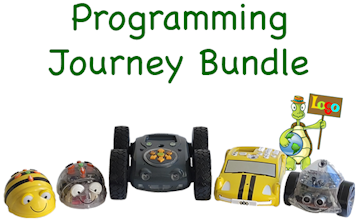 The Programming Journey Bundle lets you compare all Terrapin robots! Ideal for STEM Centers, Maker Spaces, Learning Labs, libraries, and other resource locations, the Programming Journey Bundle offers a robot and coding challenges for students of different ages and skill levels. Start with Bee-Bot, practice remote control with Blue-Bot, explore more broadly with Tuff-Bot, learn angles with Pro-Bot, and send InO-Bot on a Logo coding journey. The bundle includes: