Terrapin Resources

Bee-Bot Buzz Home


2025-2026 School Year

April 2026 Issue Activities for Multiple Bots, Logo Blocks Turtle Dance, Accessories

February 2026 Issue Logo Blocks, Curriculum Discount, Coding Journeys, Accessories

December 2025 Issue Bots as Gifts, CS Activity Day, Bee-Bot Insider, Mat Lesson Ideas, Kinderlogo Gallery

October 2025 Issue Free Curriculum Trials, Bee-Bot Job Roles, Bee-Bot Insider, Play Ball! Bundle

August 2025 Issue Blue Connection, Bee-Bot Insider, Project CODER, Garden Fun


2024-2025 School Year

June 2025 Issue Product Updates, ISTE STEM Guide, Charging Tips, New Emulator Mats

April 2025 Issue New Mat Bundle, Bee-Bot Research, Tools for Exploring, How to Share a Story or Mat

February 2025 Issue Jacket Collection, Meet Daphne and Discover Gracie, CA Wildfires, Confused Students?

December 2024 Issue “Going Places” Bundle, Teacher-Created Online Mats, Tablet-Friendly Kinderlogo

October 2024 Issue Updated Hive Case, Coding Story, Kinderlogo for Home, What’s a Bee-Kin?

August 2024 Issue Storytime STEM, ISTE, Classroom Bundles, Bee-Bot Olympics


2023-2024 School Year

May 2024 Issue Coding Journeys, Coding to Learn, Bee-Bot Mats

March 2024 Issue Dancing with Robots, Lending Library, New Bee-Bot Lessons Additions

January 2024 Issue Exploring Math with Blue-Bot, Bee-Bot Parade, Bee-Bots Around the World

November 2023 Issue Research, Emulator Features, Calendar Mats, “52 Ideas for Kinderlogo

September 2023 Issue Announcing Kinderlogo, Tennessee Initiative, Bee-Bot vs. Blue-Bot, Spooky Sounds


2022-2023 School Year

June 2023 Issue Ideas for Mats, Accessories Chart, Blue-Bot Curriculum, Unplug your Bots!, New Emulator Features

April 2023 Issue Funding for Robots, Sensors,
Bee-Bot Research, AI Poetry

February 2023 Issue Blue-Bot Delivery Service, More Bee-Bot Dances, Bee-Bots for Specialists, NCCE

December 2022 Issue Next Step: Pro-Bot, Charging Tips, Bee-Bot Dances

October 2022 Issue Bee-Bot Lessons Gets an Update, Bee-Bot Quick Start Guide

Volume I, Issue 3 ~ February 2023


Greetings!


Bee-Bot Buzz helps you make the most of the Bee-Bots and Blue‑Bots in your school. Learn how to engage students in curriculum concepts and problem-solving using these fun robots and find out how other educators are using them.


In this issue:

  • Blue-Bot Delivery Service
  • Going to NCCE? You Might Win a Bee-Bot!
  • Bee-Bots Keep on Dancing!
  • Who is Using Bee-Bots in Your School?
  • Quick Links to Free Resources

Blue-Bot Delivery Service


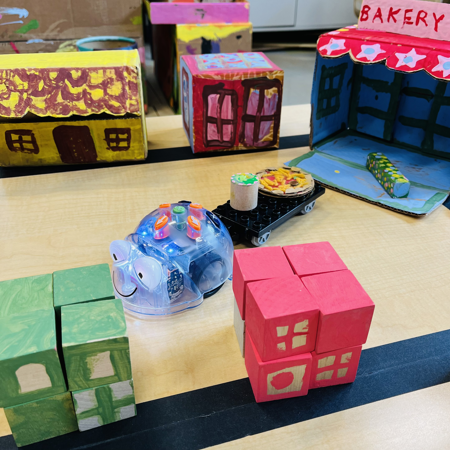
At Bennett Day School in Chicago, Blue-Bots are making deliveries around the small town constructed by students. Frances Judd, Early Childhood Teacher in the school’s Tinkering and Engineering Sciences Lab, shared her stories and pictures of this engaging tabletop robotics activity.

bennett1 image

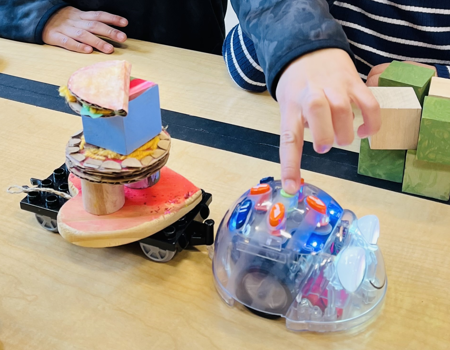
The young students worked with blocks, upcycled boxes, and art materials to create a small town with buildings, numerical address plates, faux food, and more. They created imaginary orders, and then programmed Blue-Bot to pick up items at the bakery or other buildings and deliver them to the correct street address.


Blue-Bot pulls a standard rolling LEGO Duplo chassis, attached with a pipe cleaner. Blue-Bot’s design includes a handy hole so it can tow something behind it.

bennett3 image

What a fun way to use Blue-Bots in a real-life application! Pizza, anyone?


Read the entire Customer Story on Terrapin's website.

Going to NCCE? You Might Win a Bee-Bot!


Bee-Bots are attending next month's NCCE in Tacoma, WA. Will you be there?


Digital Learning Coaches Kristin Brouillet and Caroline Gaskill from Edmonds, WA, are incorporating Bee-Bots into their sessions. They tell us:


Integrating robots into the elementary classroom provides authentic and engaging ways for students to develop their social-emotional learning, computational thinking, and content area skills.


At the Northwest Conference for Computer Education, we'll help teachers learn more about Bee-Bot and other robots appropriate for elementary-age students and give them a checklist for successful implementation. 


For example, we use this multiplication lesson (PDF) with students in Grades 3–6. The video shows Bee-Bot in action!

See us at NCCE on March 21 & 22 in Tacoma, WA.

Enter your name for a chance to win a Bee-Bot robot!


Robotics in Elementary- Integrating Computer Science with SEL & State Standards


Exploring Robotics for the Elementary Classroom


~ Kristin Brouillet and Caroline Gaskill

Digital Learning Coaches

Edmonds (WA) School District

Bee-Bots Keep on Dancing!


The December 2022 "Dancing Bee-Bots!" story in Bee-Bot Buzz inspired Suzy Kitchen, Education Director of the Roberson Museum & Science Center in Binghamton, NY, to share how her team got Bee-Bots dancing! Here's her story.


In our "Bee-Bots Can Dance" activity, students write code and input it into Bee-Bot. Then, when Nikolai Rimsky-Korsakov's "Flight of the Bumblebee" music starts, a student pushes GO! 


"Bee-Bots Can Dance" is a great way for K–1 students (and older kids, because they love Bee-Bot) to practice their early computer science and digital fluency skills as well as the early reading skill of left-to-right progression. They practiced printing an arrow for the input as well. 


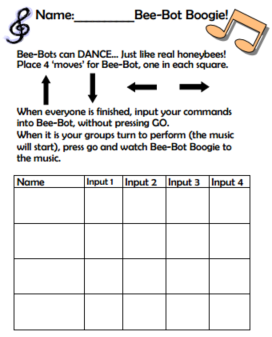
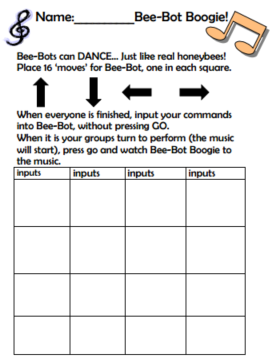
We used the "Bee-Bots Can Dance" in groups or individually. There are two different sheets for recording commands. The first one is for four students to each write a line of code and then input their commands into Bee-Bot. The second sheet is for an individual or pair of students to complete. 


Students write a command with letters (Fd, Bk, Rt, Lt) or an arrow in each box on the sheet. When the boxes are filled, students enter the commands (push the buttons) on Bee-Bot and hover a finger over the GO button until the music starts. 


The "dance moves" are spontaneous and random when younger students code, but become more formalized with older kids.


"Bee-Bots Can Dance" sheets were developed by Binghamton City School District Challenge Enrichment teachers.

Click the images below to view the "Bee-Bots Can Dance" sheets.

BB-Dance image
BB-Song image

Thank you, Suzy!


Please send us your stories and materials for using Bee-Bots and Blue-Bots!

Who is Using Bee-Bots at Your School?

Give specialists an opportunity to use them!

Do your school's Bee-Bots stay in your classroom, computer lab, or another special area? There may be others in the school who could make good use of them in unique ways.


We hear from schools that Special Education teams, Librarians, Speech-Language Pathologists, Occupational Therapists, and Guidance Counselors like to use Bee-Bots with the students they see. These specialists can tailor their use of Bee-Bots to what they are working on with small groups or individual students. That may be teamwork and kindness for the Counselor, expressive language skills for the SLP, motor control for the OT, or practicing specific concepts for the SPED team. Librarians might use Bee-Bots in a learning center that students rotate through after choosing books. Specialists learn that students are super-motivated to work on any task if a Bee-Bot is involved!


If you are in charge of Bee-Bots at your school, here are some tips to get specialists and other teachers involved and manage your Bee-Bot inventory:


  • Invite specialists to your classroom when students are using Bee-Bots to see how Bee-Bots work and experience the students' engagement firsthand.


  • Explain what they need to know in an ad hoc mini-training session or more formal event when you can train many people at once.


  • Create a sign-out sheet to keep track of your Bee-Bots. Make sure the borrowers know that you need them back by a specific date or time.


  • Give them a copy of their sign-out information and any other information you wish to share with them.


  • Check with them after they use the Bee-Bots and see how it went. You may learn things about some of your students that you didn't know before!


Is this happening in your school? Please let us know! Email beebotbuzz@terrapinlogo.com.

Quick Links to Free Resources


Bee-Bot Lessons ~ With 186 lessons and 570+ online activities. Preview it!


Problem-Solving with Bee-Bot ~ Preview this new product.


Bee-Bot Online (free) ~ Explore with Bee-Bot in your web browser using any of our many mats.


Blue-Bot Control App ~ Choose a skill level to explore angles & loops.

We Want to Hear from You!


We'd love your feedback on our products and suggestions for new content and features. Send your ideas to: beebotbuzz@terrapinlogo.com.


Do you have photos or videos of students using Bee-Bots or Blue-Bots that you have permission to share? We'd love to see them and perhaps feature them in a Bee-Bot Buzz or on our website in a Customer Story.

Terrapin | 955 Massachusetts Ave, Suite 365 | Cambridge, MA 02139 

800-774-LOGO (5646) | +1-508-487-8181 (international) | Fax 617-302-9778

terrapinlogo.com | facebook.com/BeeBot.us | instagram.com/terrapin.tools.for.thinking


Take our Turtle Tuesdays Logo coding challenges on Facebook and Instagram each week!

Visit the Turtle Tuesdays web page to see all the challenges and solutions.

Facebook  Instagram  YouTube
Search Results for ""