Terrapin Resources

Bee-Bot Buzz Home


2025-2026 School Year

April 2026 Issue Activities for Multiple Bots, Logo Blocks Turtle Dance, Accessories

February 2026 Issue Logo Blocks, Curriculum Discount, Coding Journeys, Accessories

December 2025 Issue Bots as Gifts, CS Activity Day, Bee-Bot Insider, Mat Lesson Ideas, Kinderlogo Gallery

October 2025 Issue Free Curriculum Trials, Bee-Bot Job Roles, Bee-Bot Insider, Play Ball! Bundle

August 2025 Issue Blue Connection, Bee-Bot Insider, Project CODER, Garden Fun


2024-2025 School Year

June 2025 Issue Product Updates, ISTE STEM Guide, Charging Tips, New Emulator Mats

April 2025 Issue New Mat Bundle, Bee-Bot Research, Tools for Exploring, How to Share a Story or Mat

February 2025 Issue Jacket Collection, Meet Daphne and Discover Gracie, CA Wildfires, Confused Students?

December 2024 Issue “Going Places” Bundle, Teacher-Created Online Mats, Tablet-Friendly Kinderlogo

October 2024 Issue Updated Hive Case, Coding Story, Kinderlogo for Home, What’s a Bee-Kin?

August 2024 Issue Storytime STEM, ISTE, Classroom Bundles, Bee-Bot Olympics


2023-2024 School Year

May 2024 Issue Coding Journeys, Coding to Learn, Bee-Bot Mats

March 2024 Issue Dancing with Robots, Lending Library, New Bee-Bot Lessons Additions

January 2024 Issue Exploring Math with Blue-Bot, Bee-Bot Parade, Bee-Bots Around the World

November 2023 Issue Research, Emulator Features, Calendar Mats, “52 Ideas for Kinderlogo

September 2023 Issue Announcing Kinderlogo, Tennessee Initiative, Bee-Bot vs. Blue-Bot, Spooky Sounds


2022-2023 School Year

June 2023 Issue Ideas for Mats, Accessories Chart, Blue-Bot Curriculum, Unplug your Bots!, New Emulator Features

April 2023 Issue Funding for Robots, Sensors,
Bee-Bot Research, AI Poetry

February 2023 Issue Blue-Bot Delivery Service, More Bee-Bot Dances, Bee-Bots for Specialists, NCCE

December 2022 Issue Next Step: Pro-Bot, Charging Tips, Bee-Bot Dances

October 2022 Issue Bee-Bot Lessons Gets an Update, Bee-Bot Quick Start Guide

Volume I, Issue 2 ~ December 2022


Greetings!


The Bee-Bot Buzz newsletter helps you make the most of the Bee-Bots and Blue‑Bots in your school. Learn how best to engage your students in curriculum concepts and problem-solving using these fun robots.


In this issue:

  • Bee-Bots Are Not Just for Your Youngest Students
  • After Bee-Bot, What's Next? Pro-Bot!
  • Are You Charging Your Bee-Bots and Blue-Bots Correctly?
  • Just for Fun ~ Dancing Bee-Bots!
  • Quick Links to Free Resources
  • We Want to Hear from You!

Bee-Bots Are Not Just for Your Youngest Students


Bee-Bots are valuable educational tools for all your elementary school students. It all depends on the projects you develop for them, especially those for older students.


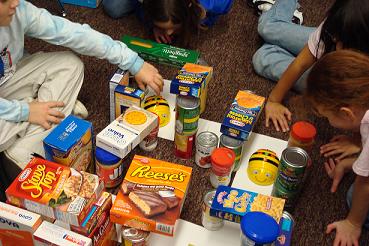
At Liberty-Benton Elementary School in Ohio, where Bee-Bots are used in Grades 2–5, students participated in a food drive for the Salvation Army. Students constructed mazes using the items they brought to donate. Students who brought in food earned a chance to program Bee-Bot through a maze. This motivated students to participate and the school had its most successful food drive ever! Read more.

liberty-benton1 image

Older elementary students can use Bee-Bots and Blue-Bots to explore content appropriate to their grade levels. At the Plato Academy in Florida, students use Bee-Bots in social studies and geography. Director Nikolaos Chatzopoulos explains that in one lesson, “students construct a mat with countries of South America, and challenge each other by programming Blue-Bot to land on a country and have the opposite team recite 5 facts about that particular country.” Read more.


Some of the Bee-Bot Lessons are designed for more advanced students. In the Foreign Language activities, for example, students learn how to say "Hello" in nine languages and what the flags of those regions look like in an online matching activity. Click the image below to give it a try!

Pro-Bots are on sale through the end of the year!

After Bee-Bot, What's Next? Pro-Bot!


Are your students navigating Bee-Bots with ease? Can they accomplish any challenge you give them?


If so, they may be ready to take the next step with Pro‑Bot. ProBots can be used just like a BeeBot for students' first interactions. But they offer so much more. Pro-Bots can:

  • draw as they move to record their journeys
  • turn at any angle to create more complex shapes
  • repeat a set of commands, even a repeat nested inside another repeat
  • use sensors for front and rear bumpers, light and dark, and sound
  • follow instructions stored in procedures, the basic building blocks of programming languages


Want to give Pro-Bot a try? Check out the new Pro-Bot emulator! Take Pro-Bot for a test drive for free, and use all the features that are available on the actual Pro-Bot. Since we first announced the Pro-Bot emulator last month, we have added new features so that beginning users can choose mats that don't involve the sensors. When students are ready, choose from three mats that have sensors activated. Now Pro-Bot can react when it hits a barrier, following instructions that you code for that sensor.

Are You Charging Your Bee-Bots and Blue-Bots Correctly?

If not, you can seriously damage them.


It is critical that you don't overcharge your Bee-Bots and Blue-Bots. Don't leave them charging for long periods of time and never for longer than overnight. Robots left charging over a weekend can cause overheating and render them useless.


The best practice is to charge a Bee-Bot or Blue-Bot when it gets sluggish, when the lights work but the robot doesn't move or turn, or when its eyes flash red.


Eye light indicators tell the status of your Bee-Bot or Blue-Bot.

Read details here.


For "See & Say" Bee-Bots (3 switches underneath) and all Blue-Bot versions:

  • Flashing Red - Low battery, needs charging
  • Solid Red - Charging
  • Solid Green - Fully charged, remove it from the charger
  • Solid Blue - Connected via Bluetooth


For the original Bee-Bots (2 switches underneath):

  • Green left eye - Charging
  • Green left eye switches OFF - Fully charged, remove it from the charger


Here is how to recharge your Bee-Bot or Blue-Bot:

  1. Set all switches to their "Off" positions.
  2. Insert the USB cable into the charging socket on the underneath side of your Bee-Bot or Blue-Bot.
  3. Connect the other end to a USB port on a computer or a USB charging plug.


If you have a Docking Station, place the Bee-Bots and Blue-Bots into the docking station and connect the power cable. When the robots are fully charged, you can store them in the Docking Station, but unplug the station.


It may take up to 2 hours to charge if the battery has been totally discharged. Once fully charged, your Bee-Bot or Blue-Bot will have approximately 6 hours of normal use and approximately 1.5 hours of continuous use.


Read battery FAQs here.

Just for Fun ~ Dancing Bee-Bots!

Do you have more than one Bee-Bot, Blue-Bot, or some of each? If so, your students can have fun programming them to perform a synchronized dance!


In the video above, teachers at the Meadowbrook School in Weston, MA, give Kindergarten students commands, one at a time, for them to program into Bee-Bot. Then they all press Go at the same time. It's great fun to watch! How carefully did they listen to the commands to enter? What could possibly go wrong? Music from Tchaikovsky's Nutcracker adds a nice holiday touch.


Try these ideas:

  • Give younger students one command at a time to program into Bee-Bot, then have them press Go at the same time, as in the video above.
  • Give older students some guidelines to get them started: how many Bee-Bots to use, where to place them at the start, how many steps to choreograph, etc.
  • Give advanced students full rein!


As students perfect their dance, they will need to observe what happens and figure out how to fix anything that didn't go as they expected. Have them write down the commands used to perform their dance. Then they can share their final dance instructions so that other students can try them.


Turn on some music and see what your bots can do!

Quick Links to Free Resources


Customer Stories ~ Read dozens of stories about how teachers are using Bee-Bots and Blue-Bots in their classrooms. Please share your story with us!


Bee-Bot Lessons Preview ~ Try some of the lessons and online mats.


Bee-Bot Online ~ Explore with Bee-Bot in your web browser using one of many mats. Try the new feature that lets you Undo the last command entered.


Blue-Bot Control App ~ Choose a skill level and explore angles and repeats.

We Want to Hear from You!


We are always looking for feedback on our products and suggestions for new content and features. Please send your ideas to beebotbuzz@terrapinlogo.com.


Do you have photos or videos of students using Bee-Bots or Blue-Bots that you have permission to share? We'd love to see them and perhaps feature them in the next Bee-Bot Buzz or on our website.

Terrapin | 955 Massachusetts Ave, Suite 365 | Cambridge, MA 02139 

800-774-LOGO (5646) | +1-508-487-8181 (international) | Fax 617-302-9778

terrapinlogo.com | facebook.com/BeeBot.us | instagram.com/terrapin.tools.for.thinking


Take our Turtle Tuesdays Logo coding challenges on Facebook and Instagram each week!

Visit the Turtle Tuesdays web page to see all the challenges and solutions.

Facebook  Instagram  YouTube
Search Results for ""